Making Postman 60% faster
How we diagnosed and fixed app launch performance — from 35-second cold boots to under 15 seconds.
We knew postman was slow. But whenever someone asked this to a lazy 10x developer he will respond like:

To prove that our app was slow we added a metric to track our p90 launch time. A launch time greater than 10 seconds means your website sucks. Ours was 35 seconds p90.
The trigger
Things were really bad. Our CEO bought the most affordable laptop he could find on Amazon — an Acer you could get in India for around ₹20,000. Not the kind of machine engineers at software companies usually carry. He opened Postman on it, and the app took two to three minutes to load.
He sent a mail to the entire company: "Performance is everyone's responsibility. We need to fix this asap."
When we looked at the numbers, the situation was worse than just one bad machine. Our P90 — the load time that the slowest 10% of users were experiencing — was around 35 seconds. That's not a cold boot edge case. It applied to warm boots too. Something was seriously wrong. In this blog I share what are some ideas that worked.
Idea 1: don't let the CPU sit idle
On slower machines the CPU is the bottleneck, not the network. So the last thing you want is CPU time wasted waiting.
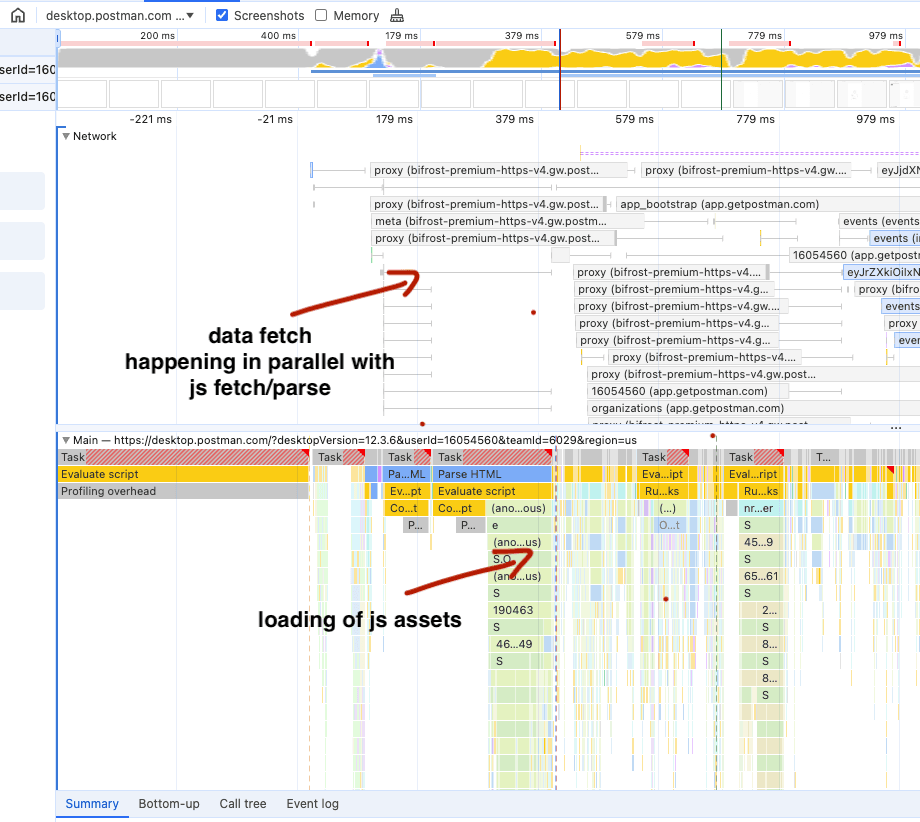
Here's what we were doing: the app loaded its JavaScript bundle, unpacked it, then made the API calls needed to fetch data. During that loading phase, the main thread was idle — just sitting there waiting for the network to respond before it could start rendering.
The fix is conceptually simple: make the API calls earlier. Instead of waiting for JavaScript to load and trigger the calls, fire them directly from the HTML via a <script> tag. Before your JavaScript bundle has even arrived, the network request for data is already in flight.
To make this work you need the data required for those API calls — IDs, tokens — available upfront, stored in localStorage or IndexedDB. It requires some engineering around the edges, but the impact is significant. Network is no longer the bottleneck sitting after your JavaScript. Both happen in parallel.
The question you should always ask before assuming your APIs are the bottleneck: is it actually the API, or is it the JavaScript bundle that needs to parse and execute first? Often it's the latter.
Idea 2: JavaScript is expensive — cut it
JavaScript is more expensive than any other asset you serve. JavaScript file has to be parsed, compiled, then executed. See this case study on the cost of JavaScript.
At a company with 200–300 engineers shipping code every week, the bundle grows constantly. Features accumulate. Years of additions pile up. The solution is well-known: code splitting. Only load the JavaScript required for the initial render. Load everything else lazily, on demand.
We cut our bundle by 50–60%. And then... nothing happened. The P90 barely moved.
Plot twist: the Electron main process
Postman is built on Electron, which has two processes: the main process (Node.js, system access) and the renderer process (where React runs). They compete for the same CPU. You don't see your main process on chrome's performance profile - it is a hidden monster.
Buried somewhere in the codebase was a single dependency: the renderer was waiting on the main process to finish something before it could proceed. From the performance profile it looked like the CPU was busy. It wasn't — it was just waiting.
This was not obvious. It required senior engineers staring at profiles for a long time. But once we found and removed that dependency, something interesting happened: all the bundle reduction benefits we'd been accumulating suddenly appeared. The P90 dropped sharply. The work hadn't been wasted — it was just blocked.
Plot twist: things got worse
We were at around 19 seconds P90, targeting 10, feeling confident. Then a release went out and our user-reported metrics ticked back up to 25 seconds. Our internal performance tests had looked fine.
This is not unusual. There's a famous 2012 blog post by a YouTube engineer who cut total page weight significantly, tested on his machine, confirmed it was faster — and then watched the overall performance metric get worse after launch. What had happened was that the app was now fast enough that it attracted users from Southeast Asia, South America, and Africa where internet connections are slower. More users, from places that couldn't use the app before. The aggregate metric got worse because the sample changed.
Our case was different but equally unexpected. The regression was coming entirely from Windows machines. One of our Webpack chunk names was being flagged as suspicious by Windows antivirus — which meant the service worker couldn't cache it. The chunk had to be re-downloaded on every load.
We couldn't reproduce it on our own Windows machines. One of our Webpack experts started investigating with a different hunch entirely, accidentally renamed the chunk, and things improved. That pointed us at the real cause.
Sometimes you're doing the right thing for the wrong reason. Keep trying.
Preventing regression
Once you fix performance, the problem is keeping it fixed while engineers keep shipping. We added two guardrails.
Bundle analysis on every PR
We use an open-source tool called Statoscope to analyze Webpack bundle output. On every PR, a GitHub Action runs and posts a report showing exactly which bundles were impacted and by how much. If a PR increases the size of a critical chunk by more than 10 KB, it requires a special approval before it can merge.
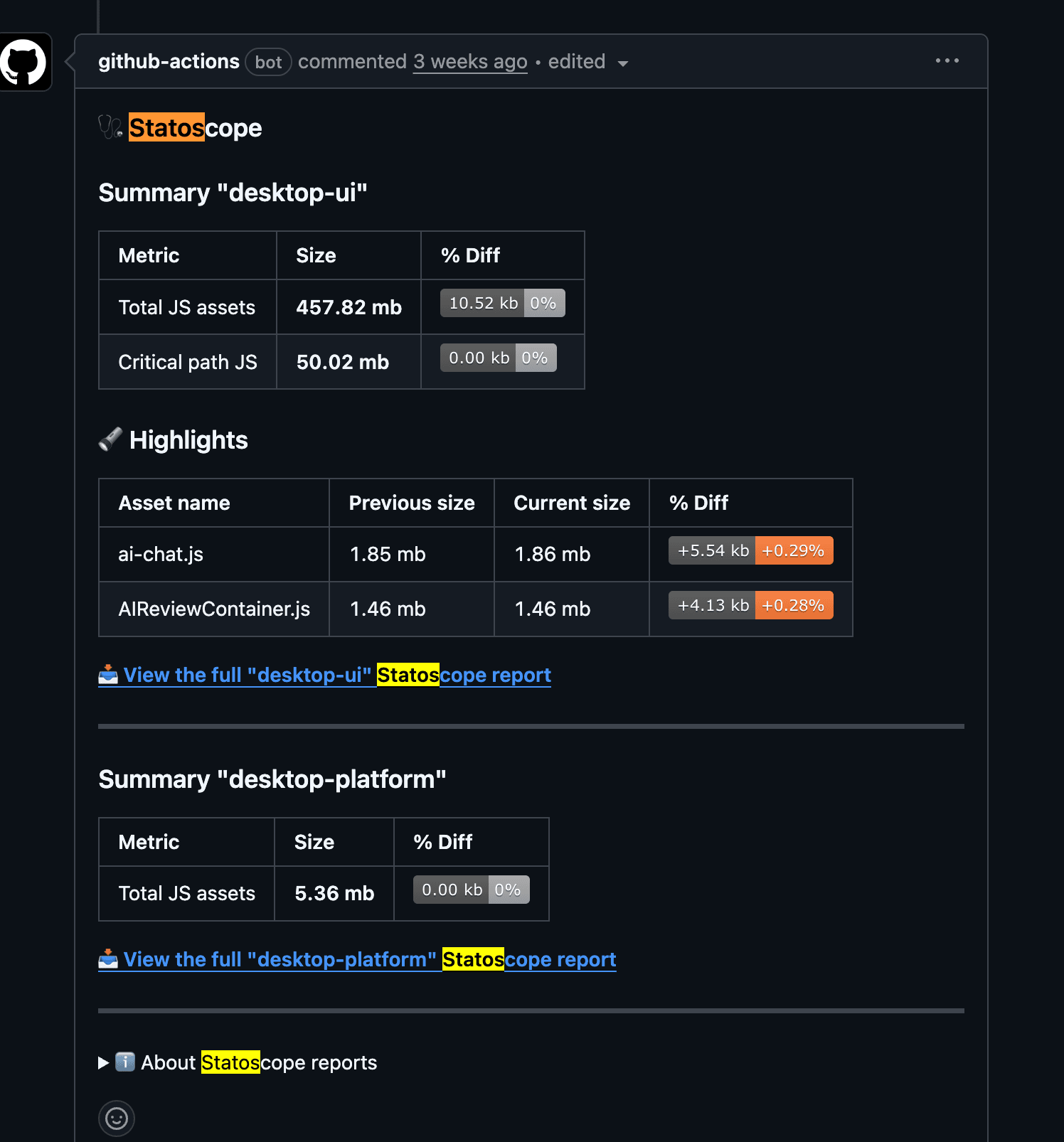
This creates friction in exactly the right place. The request tab — what most users see first — should load as fast as possible. We don't let that chunk grow quietly.
Performance tests on every release
Before any release ships, we launch the app 200–300 times and measure load times. If the metric regresses beyond a threshold, the release is blocked or the relevant team is notified immediately. This caught the issues that our internal testing on fast machines would never have surfaced.
What I took away
We started at 35 seconds P90. We targeted 10 seconds. We landed at around 14 seconds — not quite there, but a real improvement that moved the metric consistently in one direction.
A few things made the difference:
- Start with a metric. Without a measurable target, you can't tell if you're moving. P90 gave us something concrete to track across every release.
- Be ready for surprises. Your ideas will mostly be right. But 10% of the time, reality will not cooperate. An antivirus flagging a Webpack chunk is not something you plan for. The metric catches it.
- Performance is never finished. You keep shipping code. The bundle keeps growing. The guardrails — PR checks, release tests — are what keep you from ending up back where you started.
Invert the problem: know where you're going to die, and don't go there.
I also gave a talk on this topic at the Rippling <-> React Bangalore meetup. Watch it here.